The PLPAK software is an integrated development environment helps the user to generate his model using the PLGen module. It allows the user to view or/and edit the used boundary element model via the PLView module. Hence he can solve it using the PLCoreMan module. The PLPost module serves as a post-processing module for the obtained results. The package could be linked to other packages such as the PTPAK which provide the capability of adding post-tensioned cables to the model.
The proposed PLPAK package consists mainly of five main parts (separate modules) as follows:
- The BE model generator (the PLGen module).
- The BE model viewer (the PLView module).
- The core solver module (the PLCoreMan module).
- The post-processor (the PLPost module).
- The post-tension module (PTPAK).
The PLGen module stands for the virtual model generator or the pre-processor of the PLPAK. It mainly changes any structural drawing to what is called the "virtual model". Modeller can import structural drawings from DXF CAD files or can draw then directly using the CAD capabilities of the PLGen. The virtual model looks very similar to the original structural drawing. The PLGen mainly define the structure using series of objects. These objects are classified into one of three categories: the geometrical objects (single slab and openings), the loading objects (column load, wall load, load patch, load assembly) and the supporting objects (column, wall, wall assembly, soil support, beam). Using such objects the modeler can define all elements in the building slab. The virtual model represents the actual slab shape (not like the centre-line model of the finite element method). Columns and walls are represented by the actual cross section shape. The PLGen can also input the numerical models of each object such as the number of boundary elements for each segments, the discretization of the beam-slab contact areas, etc. Load cases only (i.e. no load combinations) are defined in the PLGen module. Material properties are also defined herein. The below Figure demonstrates the graphical user interface of the PLGen module.
The following table states the types of objects available in the PLGEn module.
| Structural Object | Typical modeling usages |
| Slab | Modeling building slabs and foundations |
| Opening | Add openings to the slab object |
| Column/Pile | Modeling supports of mean dimensions like most of structural columns supporting Building slabs or Piles supporting foundations |
| Beam | Modeling of beams supporting the slabs |
| Wall Support | Modeling supports elongated in one direction like a buildings shear walls |
| Support Assembly | Modeling supports of complex geometry like buildings cores or broken shear walls |
| Load Patches | Add a distributed load over a quadrilateral part of the slab object |
| Column Load | Add vertical force and two moments over a quadrilateral part of the slab object |
| Wall Load | Modeling Loads elongated in one direction like a buildings shear walls loads over a raft foundation and loads over slabs due to brick walls |
| Load Assembly | Modeling Loads of complex geometry like buildings cores loads over a raft foundation |
| Soil Support | Modeling the soil supporting the building foundation |
The capabilities of this module can be summarized as follows:
- Construct a virtual structural model for the problem using object-based modeling. This is proposed to be done through an interactive graphical interface that can construct and edit the virtual model.
- Generate a BE model from the virtual model.
- Control the generated BE model through the graphical interface using parameters settings.
- Import CAD drawings to facilitate the construction of the virtual model.
- Store the virtual model in a binary form so that it can be recalled later.
- Undo and redo changes made to the virtual model.
- Construct a 3D view of the virtual structural model.
- Handling different load cases and generating a BE model for each one.
The PLView module is a MDI (multiple document interface) graphical environment that allows the modeller to view or/and to edit the boundary element numerical model of the considered problem. Boundary element discretization and internal loading or supporting patches are viewed. The PLView could be launched directly from the PLGen module. Practical engineers or beginners can skip this module. The expert modellers can write their own input text file for the considered numerical model and input it directly to the PLView model without passing through the PLGen module. The below Figure demonstrates the graphical user interface of the PLView module.
This is the BE model viewer that is developed to visualize the generated boundary element models generated by the PLGen module or from user text input. This module has also some model editing capabilities that are considered a secondary benefit. Only advanced users who have thorough understanding of boundary element modeling can make use of this feature. The core component of this module is proposed to be a dataset that contains data tables of all the entities forming the model. This dataset can be thought of as a database that resides in the computer memory rather than on the computer hard disk. This technique is usually faster for data centric applications especially when the size of data is not large, as the case when using BEM. The dataset is populated using the data that already exist in the input text file (*.in) and then the populated dataset is used to visualize the model. The model data typically consist of material parameters, linear equation solver parameters, nodes coordinates, points coordinates, elements connectivity data, columns definition, cells definition and internal points coordinates.
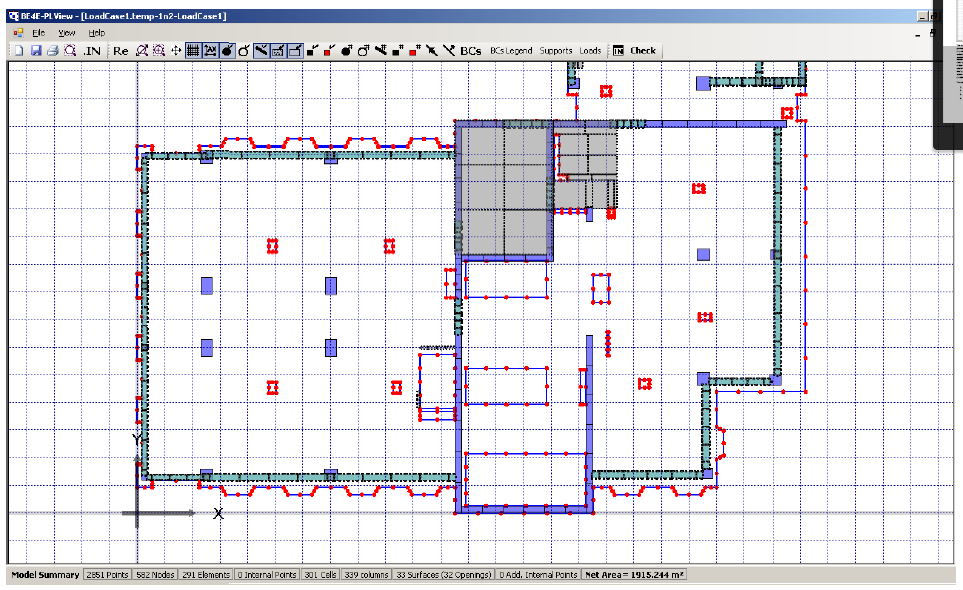
The capabilities of the BE model viewer can be summarized in the following:
- Display all the model data graphically.
- Display all the model data in tabular form.
- Edit the model data in the tables.
- Store the model again in text format after editing.
The PLCoreMan module serves as a link between all of the PLPAK modules. It allows solution for
multiple load cases. It also allows adding any additional loading (such as pre-stressing loading) or
sophisticated supporting elements (such as any substructure). It also acts as solution tracer.

This is the part of the PLPAK that is responsible for solving the boundary element model (saved by the
PLGen) using Reissner plate bending equations. The main part of the module is the PL.exe which is the
core solver. This module allows the user to add post tensioning cables and updates the input files
according to the cables added. The below Figure demonstrates the generic operation diagram for the
PL.exe core solver.
The PLPost module allows the user to display the results in forms of strips, contours, and colour patches.
All results obtained in the PLPost environment are computed using analytical
integral equations. In other words, no approximation is involved. Load combinations are defined herein.
Results of any form could be exported easily to text files or to spreadsheets programs. The below Figure
demonstrates the graphical user interface of the PLPost module.
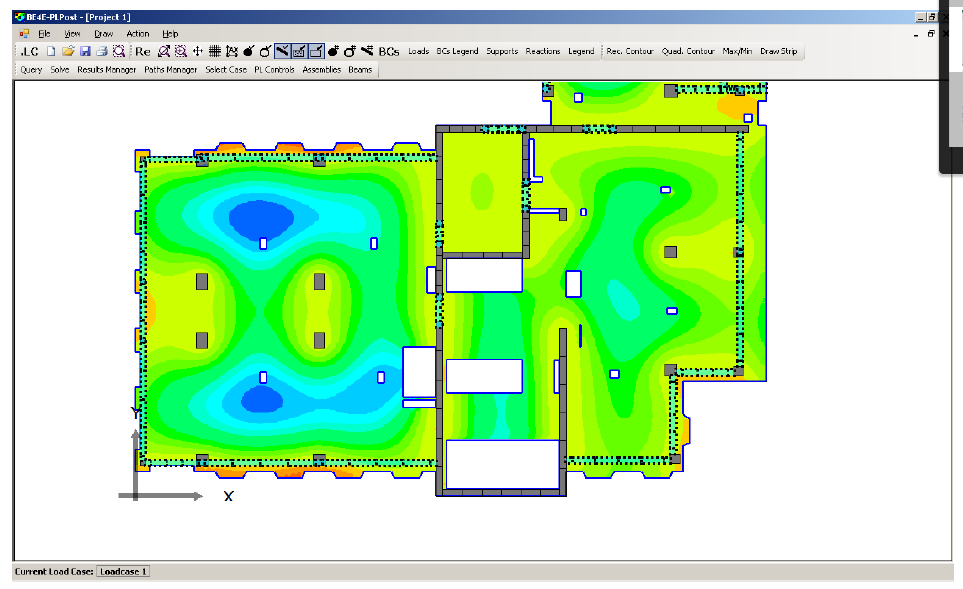
The proposed capabilities of the post processor can be summarized in the following:
- Represent the results at a point.
- Represent the results along a line.
- Represent the results over an area using contour plots.
- Export the results in formatted text files.
- Store the results in a binary form, so that it can be recalled without repeating the analysis.
- Perform the load combinations of different load cases.
- Display the columns reactions or soil contact pressures under the raft graphically.
The PTPAK is the software component responsible for the creation of cable profiles and updating them to the structural model.


